Arguably, the essential tool for any healthcare organization is a website. That’s right, a healthcare web app is an invaluable thing that’s only been made more necessary in recent years.
Only in 1965 did Americans get a general hospital and medical care. Today, nearly 8 in 10 U.S. adults go online to answer specific questions about health symptoms or conditions, according to a 2025 survey by the Annenberg Public Policy Center. Almost two-thirds of them report seeing AI-generated responses during that search.
As for Europe, in 2024, 58% of EU citizens searched for health-related information online, 40% booked medical appointments through websites, and 28% accessed their personal health records digitally.
As people go digital more and more, it’s important for medical organizations to communicate healthcare information in a new, digital way. That’s why healthcare web development is getting so much attention now. Even if you have 1000 patients requesting their blood test results at the same time, a healthcare web app can save you so much time to assist a patient remotely and automatically.
In this article, I’ll explain to you all the nuances of healthcare web development. We’ll check the main trends in healthcare website design and look at the average cost of healthcare website development.
Why Build a Healthcare Web App?
We at Uptech like asking “why” first, before jumping right into the development. So let’s take a look at the reasons why you should actually start a healthcare development. Here are a few of the big reasons:

Build trust andcredibility with patients
For many patients, doctors remain the most trusted sources of healthcare information. At the same time, around 70-80% of Americans look up health or medical information online, and nearly 69% rely on the internet as their primary source. When a website clearly explains services, shows credentials, and includes patient testimonials, it helps turn online research into trust and informed provider choice.
Be present 24/7
People may need medical help in the early morning or in the middle of the night. It's especially common among hospitals as patients may need guidance or directions asap. If you have a healthcare web app, you give the clients 24/7 support. It means they can book an appointment, access the information, and get consultancy in minutes without going to the hospital.
Compete in the market
To compete in the market, healthcare providers must meet patients’ needs better or at a lower cost than their competitors do, or both. And developing a healthcare website is one of the important steps along this way. As I mentioned earlier, the majority of patients choose one provider over another based on a strong online presence. In addition, healthcare attracts strong investment, which makes the market both competitive and future-focused. Research by Deloitte shows that digital transformation plays a central role in how healthcare systems evolve. Most executives expect wider use of digital technologies, and providers that invest in digital platforms and core systems gain an advantage in cost, access, and patient experience.
Improve online visibility and discoverability
No doubt left that to exist, you need to be online. And a healthcare website is always at the core of it. It must also stand out. A well-designed healthcare website attracts attention, explains services clearly, and answers patient questions at the first touchpoint. This clarity helps visitors stay longer, build trust, and move from search results to real appointments.
Optimize workflows and patient communication
A healthcare website can support more than patient discovery. It can reduce administrative load and improve day-to-day operations. Online forms, appointment requests, secure messaging, and clear information flows help staff spend less time on manual coordination and more time on patient care. For patients, these tools create faster responses, clearer communication, and fewer gaps across the care journey.
Healthcare Web Design Trends
Love it or hate it, but healthcare web app development isn't possible without a good healthcare website design. Many websites have all the bells and whistles, but they don't provide value for the patients. What's worse, the healthcare web design can be confusing.
Here are a couple of trends to keep in mind when doing your healthcare web design:
Data visualization
Showing the test results and a dynamic of the treatment is good, but it's a must. One of the things that can differentiate you from other healthcare websites is visualizing all this data in an informative, clean, and well-designed way.
Here is how to make data visualization on your healthcare website correctly:
- Show only useful information for the users. Don't clutter the screen.
- Keep the visualization simple, clear, and clean.
- Don't reinvent the wheel. Use ready but working solutions. There's nothing bad about it.
- Add the description to the data.
- Mind the color of the charts and graphs. The elements' contrast level should be high enough.

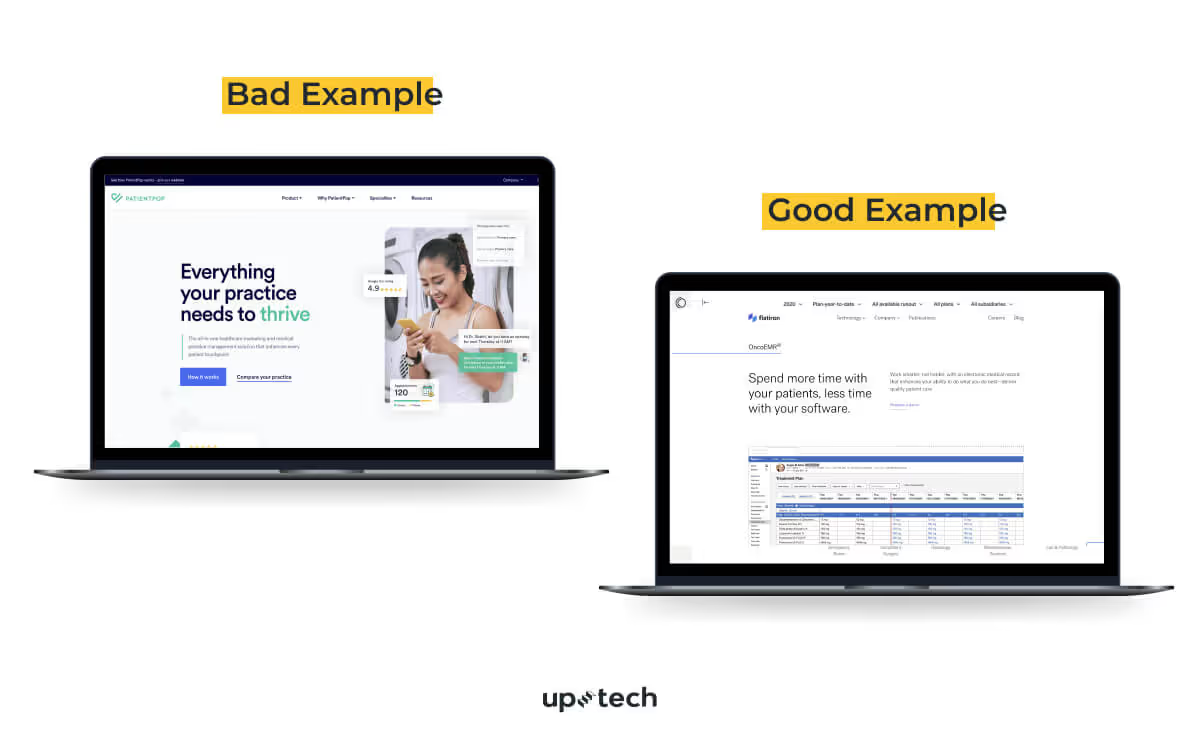
Bad example. Overloaded interface with too many elements shown at once. Competing colors, dense charts, and unclear hierarchy increase cognitive load and make it hard for users to focus on key actions or information.
Good example. Clear layout with strong visual hierarchy and purposeful use of space. Key metrics stand out, navigation feels predictable, and data is easier to read and interpret, which supports faster decisions and better user experience.
Website accessibility
Whenever you develop a medical web app, you should tailor it to people with disabilities, so they can use it without a struggle. It means adding size-adjustable text, voice readers, text transcripts for podcasts, HTML tags & captions, color contrast, and alt text on images.
For more information on healthcare web design accessibility, check out the ADA compliance checklist.
Here's how to make your healthcare website accessible:
- Follow the Web Content Accessibility Guidelines, based on your target audience and regulatory requirements.
- Optimize your website design for mobile use, as many patients access healthcare information from their phones
- Use clear structure, readable fonts, and sufficient color contrast to support users with visual impairments.
- Add descriptive labels, alt text, and keyboard navigation to support assistive technologies.
- Test accessibility regularly with both automated tools and real users to identify and fix barriers early.

Bright colors
This one is a bit more obvious, but using pale colors on your website can influence user engagement and conversion. So, direct your healthcare web designer to use high-contrast colors and select the text that’s larger and easier to read at lower contrast for your web pages.
Here's how to use colors in your healthcare website wisely:
- Use 2-3 main colors to keep the interface consistent and easy to scan. A limited palette reduces cognitive load and helps users focus on key actions.
- The colors shouldn’t be of a high contrast level between the background and text. Instead, aim for accessible contrast that supports readability without causing visual strain.
- Apply stronger colors to important elements such as calls to action, links, and status messages, while keeping informational sections calm and neutral.
- Test color choices across devices and lighting conditions to make sure content stays readable for different users.
Simple navigation
Even though patients can use your website for different purposes, the truth is they should find all the information fast and easily. The study shows that 94% of people name easy navigation as the most useful website feature.
Here's how to make the navigation on your healthcare website simple:
- Include a menu for your most important pages, such as services, doctors, appointments, and contact information. This helps users understand what you offer at a glance.
- Add clear CTAs that guide patients toward the next step, such as booking an appointment or contacting your team, without forcing them to search for it.
- Use familiar labels and wording so patients do not need to guess where to find specific information.

How to Develop a Healthcare Web App?
You can find different approaches to healthcare web development. At Uptech, we are following the next 5 steps to build a robust healthcare web app:
- Discover the market
- Design and test a prototype
- Make your web app compliant
- Design and develop a healthcare website
- Launch & improve your healthcare web app
Let’s go through each step in more detail.
Discover the market
I'll not reveal any secrets to you, but healthcare web development starts with market research. Before moving further, you should ask yourself the key questions:
- What problem am I going to solve?
- If people look for a solution?
- Are people ready to pay for it?
We at Uptech love Discovery because this is the stage where you meet your users and learn their real needs. We help with researching the market, competitors, and target audience. Our Product Managers work in tandem with the Design team to create proto-personas to understand the type of your customer. To understand the audience better and identify deeper insights, we conduct user interviews. And the last step is creating CJM to analyze the user's experience and behavior through all steps.
Design & test a prototype
When you stop finding new information about the market, users don't tell you anything new and insightful, it's time to design prototypes. But it doesn't mean that you should stop researching at all. What I'm saying is to devote 25% of resources to research and put all the rest to prototyping.
Your healthcare web app prototype should already envision the idea of the product and embody its basic functionality to test it with real users. It's not about healthcare website design only, but a general business logic and the basic functionality. For example:
- How do the payments work?
- How do we verify patients?
- What is the best way of communication between patients and doctors?
We find the users of the target group and test prototypes with them. The key is to be as objective as possible and not let your initial assumptions blind the real customer's decision-making process.
This approach also supports MVP development, where the goal is to validate core assumptions before investing in full-scale development. We applied this exact model when building Clearly. We started with a focused MVP that tested onboarding logic, therapist–patient communication, and session flows. Early prototype validation helped confirm product decisions, reduce rework, and shape a scalable healthcare platform based on real user behavior rather than assumptions.
Make your web app compliant
When you develop a healthcare web app, you'll have to follow all HIPAA regulations. In Europe, all apps that process personal information must comply with the GDPR.
The idea of HIPAA is to ensure the protection of personal healthcare information for both parties: patients and healthcare providers. I have described how to ensure that your app follows HIPAA requirements in the previous article on Healthcare mobile app development. Check it out, there are many useful resources.
Also, the Uptech blog contains a complete technical guide to HIPAA and GDPR compliance that explains what aspects to pay attention to, what things must be done from the very beginning, and what can be postponed. So make sure you get acquainted with it, too.
When we were developing a healthcare web app for a clinic in the USA, we provided data backup for client information, worked with compliant 3rd-party providers, and used data encryption. Data privacy was our top priority.
Design & develop a web app
I've said earlier that medical website design weighs a lot in the healthcare web development process. You should hire a good UX/UI designer to take care of both parts.
For us, design isn't just pixel-perfect icons; it's about the research and human experience. We deeply study user behavior to create a consistent and intuitive healthcare web design. Such a design aims to smoothly lead the user to the endpoint and reduce your app's cognitive load to a minimum.
The coding part consists of two stages: frontend and backend. You should choose the technology stack very wisely, as it affects time, quality, ability to scale, and the cost of development. Yes, it matters a lot. If you’re not a tech person, you should hire a professional web developer to help you choose the best tech stack option.

Before every project, we arrange a meeting for the Uptech team and the client to meet each other and discuss the details. Our Solution Architect always takes part in this meeting, so we propose the solutions that we think will work best for your project specifically.
In general, recommend using the following tech stack for a healthcare web app:
Backend:
- Node.js (handles real-time features such as messaging, notifications, and API logic)
- MySQL (stores structured healthcare data such as users, appointments, and records)
- AWS (provides secure cloud hosting, scalability, backups, and compliance-ready infrastructure)
Frontend:
- HTML5 (defines page structure and supports modern web standards)
- React (builds dynamic, responsive user interfaces for complex user flows)
- CSS3 (controls layout, styling, and visual consistency across devices)
- JavaScript (powers interactivity and client-side logic)
- D3.js (visualizes data for dashboards, analytics, and reporting)
Beyond core web technologies, we also integrate AI capabilities into healthcare web apps where they add real value. AI helps automate routine tasks, support faster triage, personalize patient communication, and improve access to information through tools such as AI-powered chatbots and decision-support systems. In healthcare, this reduces staff workload, shortens response times, and helps improve patient care as they get answers when they need them.
Depending on product goals, we implement AI features directly into the platform or support them through tailored AI consulting services, from use case assessment to model selection, integration, and long-term support. This approach allows healthcare providers to adopt this technology safely, responsibly, and in line with clinical and regulatory requirements.
Launch & improve your healthcare web app
Finally, after all the time and effort you have put into discovery, testing, designing, and development, we approached the final stage – the product launch. Usually, the moment of the launch is the point where you get the most important insights.
At this stage, real usage data replaces assumptions. Analytics such as conversion rates for appointment booking, form completion, message response time, and drop-off points across key flows help teams understand how patients and staff interact with the product in practice.
To make sense of this early feedback, teams should focus on a few core questions during the post-launch phase:
- What analytics should you add to your web app?
- What are the most usable features?
- What should you add to the next app versions?
Combined with qualitative feedback from patients and internal teams, this data helps define priorities for the next releases, validate product decisions, and guide incremental improvements without disrupting existing workflows.
It is essential to take all the feedback and learning into account, test, and improve the existing functionality.
8 Key Features of a Healthcare Web App
In the case of healthcare web development, the features should be essential and simple.
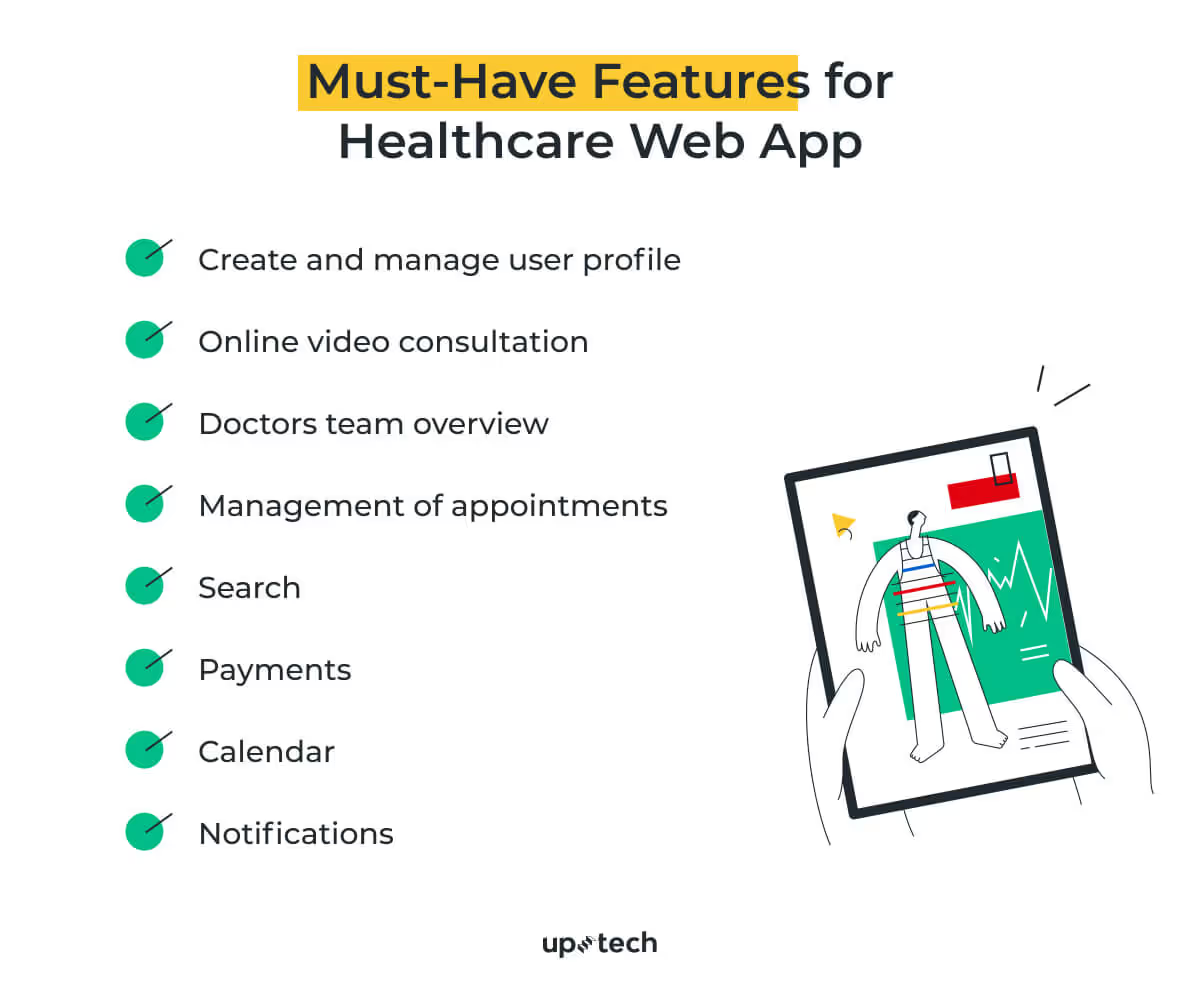
Here are some of the key healthcare web app features that you should consider:
- Create and Manage User Profile. Your app is your user’s health concierge. Let patients easily create profiles with medical history, allergies, and preferences. Make it simple yet secure, giving users confidence that their data is in safe hands.
- Online Video Consultation. Think of this as the “Netflix for healthcare.” Enable seamless video calls between patients and doctors with HD clarity, secure connections, and even screen sharing for reports. Convenience and care, delivered virtually!
- Doctors Team Overview. Highlight doctors with profiles that include specialties, experience, and ratings. It’s like swiping right on the perfect healthcare match. Trust-building starts here.
- Management of Appointments. No one likes a long wait. Offer patients and doctors a digital scheduling assistant to book, reschedule, and manage appointments effortlessly. Efficiency breeds loyalty.
- Search. Imagine a Google search but for health needs! Whether it’s finding a specialist or a clinic, make search intuitive with filters like location, availability, or language. Results in seconds—because time is health.
- Payments. Healthcare is priceless, but billing isn’t. Integrate multiple payment methods, from cards to wallets, ensuring transactions are smooth and secure. Think fast, think frictionless.
- Calendar. A built-in calendar keeps everyone on the same page. Sync appointments, reminders, and follow-ups. Bonus points for integration with Google or Apple calendars because healthcare shouldn’t clash with life.
- Notifications. Never let patients miss a beat. From appointment reminders to prescription updates, timely and tailored notifications keep users engaged and cared for. Your app is their healthcare guardian angel.
This list covers the core features, but every healthcare product has its own context, workflows, and regulatory needs. Other features may be just as important, even if they are not visible at first glance.
If you want to explore which features make sense for your healthcare website or web app, reach out to our team. We can discuss your goals, user needs, and constraints, and help define a feature set that fits your product.
Cost of Healthcare Web App Development
The average price of building a healthcare web app with full backend infrastructure and a design is approximately $100,000. The price includes product management, QA, and team communication services. In practice, the total cost of healthcare software depends heavily on product scope and complexity. A simple MVP healthcare web app can start at around $40,000, while more complex products, especially those that include AI features, advanced analytics, or deep system integrations, can reach $300,000 or more.
We have a separate article dedicated to the cost of healthcare app development, along with the factors that impact the pricing tag and possible additional expenses.
The feature-level estimates shown below are calculated using a $50 per hour rate, which reflects the lower end of Eastern European development costs. These numbers help illustrate how individual features contribute to the overall budget.

Of course, the final price depends on the website complexity and the type and location of the team. For example, outsourcing a healthcare web design&development company in the USA will cost you more than in Western Europe. But hiring a company from Eastern Europe, like Uptech, will be even more cost-effective. The average price of a web developer here is $50-70/hour compared to $150 in the USA and $100 in Western Europe.
Uptech has an app development cost calculator you can use to get a rough estimate of building a healthcare web app.
Bonus Infographic on the Healthcare Industry

- Healthcare remains one of the fastest-growing startup industries by investment volume. The global healthcare technology market is expected to grow from $592.49 billion in 2025 to $1,251.38 billion by 2029, with a 20.6% CAGR, which reinforces long-term demand for digital healthcare products.
- More than 1 billion of all Google searches are healthcare-related (Google)
- Around 80-85% of internet users search online for health-related information, including doctors and medical services, making the web a primary starting point for healthcare questions. (PMC)
- Of all internet users, 66% look online for information about a specific medical problem or disease. (Pew Research)
- Around 84% of patients check online reviews before choosing a healthcare provider, and many read multiple reviews to inform their decision. (The Rater8 2025 report)
- Search drives 3x more visitors to hospital sites compared to non-search. (Google)
- 2.4% of healthcare appointments are scheduled online. (Accenture)
- Over 60% of consumers run a search before scheduling an appointment. (Invoca.com)
Sum Up
Healthcare web development isn't a smooth and easy road. It takes a lot of attention to detail, such as competing in the market, creating a trendy and user-friendly design, choosing the right tech stack, and making it compliant.
The development of a medical web app requires good tech expertise and a professional team. We at Uptech are ready to help with both. With the six-year experience and profound expertise in healthcare app development, we are eager to become your solid partner and make your idea come alive.
Contact us to get your project off the ground.