

Small and mid-sized businesses often delay AI projects for one reason: the budget feels hard to predict.
This hesitation shows in adoption numbers. In 2025, only about 17% of small companies and 30% of mid-sized companies reported using AI, compared to more than half of large enterprises.
Developing AI apps or integrating AI can be expensive, especially when a product needs custom data work, system integrations, or stricter security requirements. But the final cost depends on the level of complexity behind the feature set.
So let’s get specific. In this article, Oleh Komenchuk, ML Lead at Uptech, and Stas Burenko, a Business Development manager, break down the approximate costs of apps at different levels of AI complexity. The goal is to help you understand current market prices and estimate the budget for your own project.
Let’s get started.
Artificial Intelligence Cost Estimation By The App Complexity
So, how much will it cost you to build an AI app? Most AI apps would cost between $30,000 to $250,000+ based on our expectations of AI functionality. General price ranges for basic, mid-level, and complex AI apps.

Basic AI app
Apps with basic AI functionality usually need minimal customization. They’re built by integrating a pre-trained model — either an open-source model you can host/adapt or a commercial foundation model accessed through an external provider. Since there’s typically no training from scratch, teams spend less time and compute, making this the lowest-cost option.
Estimated fee: $30,000 – $60,000.
Basic AI apps help companies test specific use cases, such as automation, recommendations, or data processing, without high upfront costs or long-term commitments. They deliver early results, show how users engage with AI features, and help teams decide whether further investment makes sense.
Examples of basic AI apps:
- A customer support chatbot that answers FAQs using a general-purpose LLM
- Text summarization for internal documents or meeting notes
- Resume or cover letter review tools using prompt-based evaluation
Average AI app
Most apps fall into this category. While they use pre-trained models, some level of customization is required — typically through fine-tuning, prompt engineering, retrieval-augmented generation (RAG), or tool calling.
Let’s say you want to build a chatbot for a customer service workflow. You can use a foundational language model, but it still needs to be adapted to understand your products, internal knowledge, and business processes. Because of the additional work, the fee is higher.
Estimated fee: $60,000 – $120,000.
Mid-level AI apps are built to improve specific operational workflows, such as process automation, data analysis, or decision support. They offer a practical level of customization and cost, making them a good fit for companies that want AI to drive measurable efficiency gains or revenue impact without developing a full AI platform from scratch.
Examples of average AI apps:
- Customer support chatbots adapted to your product catalog, FAQs, and policies
- AI assistants for sales teams that understand your offerings and pricing logic
- Internal knowledge bots for employees, tuned to company documentation
Complex AI app
Be prepared to pay more if you’re developing an AI app that requires training from scratch. Model training involves dataset preparation, an exercise that potentially takes hundreds of hours. As such, these apps are the most expensive to build.
Estimated fee: Above $150,000.
Complex AI apps automate high-impact decisions, predictions, or processes that are difficult or costly to scale with human effort alone. They make sense when AI directly affects revenue, safety, regulatory compliance, or core intellectual property.
This level of AI suits organizations with a clear plan to make AI a long-term strategic capability.
Examples of complex AI apps:
- Fraud detection engines built on years of transactional behavior
- Risk scoring models for finance, insurance, or lending
- Predictive maintenance systems for industrial or IoT environments
If you want to dive even deeper into this topic, we’ve written an extensive article about it. You can explore the cost of implementing different types of AI here.
AI App Development Process
Like other apps, you’ll need to go through specific stages to develop an AI product. And that’s where the bulk of the cost comes in. To give you a better idea, let’s briefly explore each stage we practice at Uptech.
Conducting market research
Before we develop your app, we’ll need to evaluate whether it’s feasible, has a market demand, and aligns with your business goals. On top of that, we explore compliance, security, and privacy requirements in the preliminary research.
At this stage, we define:
- The specific business problem the AI is expected to solve and the decision or workflow it will support
- The target users and scenarios where AI-driven output delivers clear value
- The success criteria that will be used to evaluate ROI after launch
For AI products, this phase also involves choosing the right model approach and deciding whether existing models can be adapted and integrated or custom training is needed. This choice directly affects budget, delivery speed, and long-term maintenance costs.
Creating UI/UX and conversation design
Part of the process of building successful AI apps is to optimize customer engagement with UI/UX and conversation designs. For example, you can provide clear onboarding dialogue to assist users when they use an AI chatbot for the first time. Although you’re creating an AI app, it’s important to keep the messages human, which showcases warmth and personality.
At this point, teams make key decisions around:
- How much guidance users need versus how much freedom the AI is given
- When the system should proactively suggest actions and when it should stay passive
- How errors, ambiguity, or low-confidence responses are communicated
- How users can correct, refine, or override AI output without friction
Conversation design plays a key role in building trust. Users should neither overestimate nor underestimate the AI’s capabilities. Well-designed interactions help prevent misuse or false assumptions about what the system can reliably handle.
Investing in this stage reduces downstream costs by:
- Lowering support and clarification requests
- Reducing repeated or failed user interactions
- Improving adoption and retention metrics without additional feature development
In practice, strong UI/UX and conversation design make the AI feel like a thoughtful product, not just a raw model behind an interface.
Building a prototype
To reduce development risks, we then build a prototype at minimal cost. A prototype is a visualized version of the app that gives users an idea of what it looks like. With a prototype, you can get early feedback from the target audience. Then, you can make changes and commit to developing the app further, knowing that you’re on the right track.
Its primary purpose is not visual polish but validation, confirming that the proposed solution makes sense to users and supports the intended use cases.
Feedback is evaluated through a practical lens:
- Do users understand when and why the AI should be used?
- Are the core flows clear without additional explanation?
- Does the AI-driven functionality feel helpful, trustworthy, and easy to engage with?
Unlike full development, prototyping lets teams test usability assumptions without committing to architecture, data strategy, or model choices. It keeps changing fast and is inexpensive.
Developing the app
Here’s where most of the work happens. At this stage, developers gather data, create training samples, select an AI model, train, fine-tune, and perform other necessary tasks to build the solution. The time they take to build the app directly translates to the cost you pay.
You can learn more about how to build an AI software here.
This step is about:
- Making irreversible technical and architectural decisions
- Balancing accuracy, performance, and delivery speed
- Managing dependencies between data readiness, model behavior, and product functionality
Progress here is typically iterative rather than linear. Early versions are tested, adjusted, and refined as new insights emerge, which requires continuous prioritization and trade-off decisions.
Costs rise with more iterations, complex integrations, and higher reliability requirements.
This phase also requires active expectation management. Clear success criteria, regular checkpoints, and transparent reporting keep development aligned with business goals.
Performing quality assurance
You can’t release the app until it’s adequately tested, especially one integrated with AI models. And this involves hours of testing, revising, and re-testing various app modules, integrations, and AI models.
How to outsource software testing? Check our guide to learn more.
Here, teams focus on:
- How consistently does the AI produce acceptable results across real-world use cases
- How the system behaves when inputs are incomplete, ambiguous, or unexpected
- Whether AI outputs remain aligned with product goals and user expectations
- How failures are handled and communicated to the user
QA also protects against reputational and operational risk. In customer-facing AI, even rare errors can quickly erode trust if they seem unpredictable or poorly handled.
Deploying the app
This stage is the cheapest, but there are marginal costs. To deploy the app, you’ll need to publish it on the Play Store or App Store, both of which charge listing fees.
For web or desktop apps, deployment means releasing the product to a production environment and setting up access, without any marketplace submission. This stage usually involves configuring servers and domains, setting up user access and security
Overall, this stage moves the app into production and sets its operational baseline. Teams ensure:
- The production environment is stable and scalable
- Monitoring is in place to track uptime, performance, and errors
- AI-related services are correctly configured to handle real user traffic
Deployment is also where infrastructure decisions start driving ongoing costs. Hosting, API usage, and scaling directly affect monthly spend, making this a key point for cost control and proving real-world reliability.
Maintaining and improving
Once the app goes live, you can’t leave it without supervision. There might be bugs and vulnerabilities that escape QA tests or changes in trends requiring app revision. Though not as much as the development itself, you’ll still need to set aside a budget for app maintenance.
This stage ensures the app continues to deliver value after launch instead of gradually degrading. Real users and real usage patterns often reveal issues that testing can’t fully predict.
Maintenance typically includes:
- Monitoring performance, stability, and user behavior in production
- Addressing issues that emerge only under real-world load or edge cases
- Updating dependencies, infrastructure, or integrations to maintain security and reliability
For AI-powered apps, improvement is ongoing. Changes in user behavior, data, or expectations often require updates to logic, prompts, or model settings to keep results accurate.
Planned maintenance helps teams avoid reactive firefighting. A dedicated budget prevents technical debt from becoming costly.
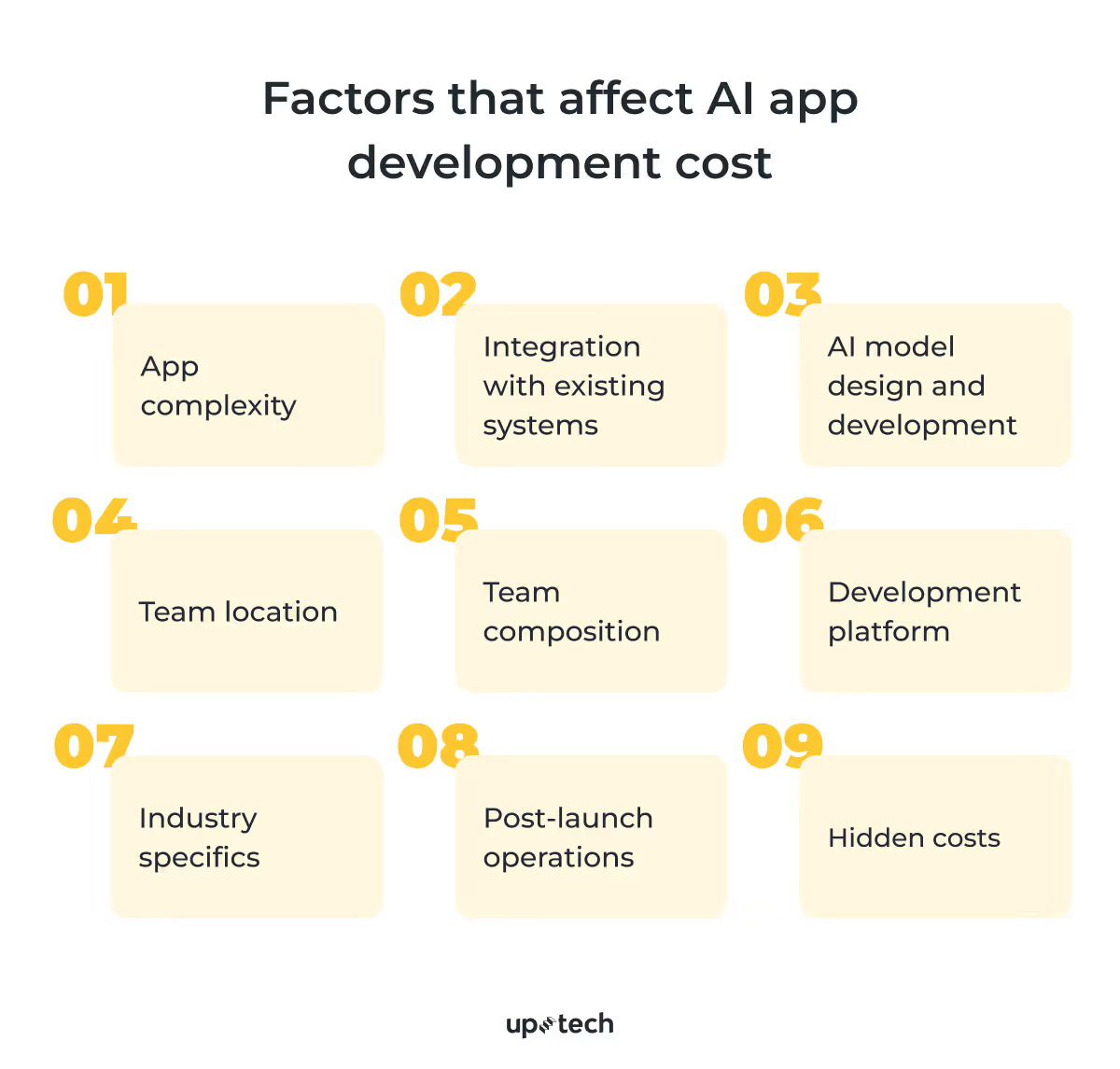
Top 9 Factors That Affect AI App Development Cost
Even with the cost estimate we’ve shown above, you might find the development fee varies when requesting a quote. That’s because many factors influence the cost of AI development.
Factor #1: Complexity
If your AI app includes only basic features, development costs are typically lower. More complex apps with advanced integrations require a higher investment.
Let’s say you want to integrate your e-commerce app with a chatbot that responds to customer queries. The fee you need to pay is much lower than building an AI diagnosis tool for medical image analysis. In the latter, developers must pay more attention to compliance, training, fine-tuning, and model evaluation.
Also, the cost of developing an AI app can increase significantly if you require more features. For example, the fee grows if your app requires:
- API integration
- IoT integration
- Phone sensors access
- Geolocation features
- Accessibility
Top that with training a deep learning model with a massive dataset, and you’ll likely pay more than $150,000.
Factor #2: Integration with existing systems
Another hurdle, which translates into cost, is AI integration with the systems that you currently use. To ensure the AI-powered app works smoothly with existing systems, developers must adapt those systems for interoperability. Otherwise, they won’t be able to exchange data with the AI app.
Often, the cost to integrate the new AI app with existing systems is manageable, but certain complications might inflate the cost.
Imagine integrating an AI-powered retail sales system with a legacy inventory solution, only to find that the inventory system would need a full rebuild. Since that option is extremely costly, teams usually rely on intermediary software to enable data exchange instead.
At Uptech, we prefer to integrate systems via APIs. When teams need AI to work across tools, we also use MCP (Model Context Protocol) to connect models to systems in a structured, auditable way. It helps speed up integration without turning every workflow into a one-off connector.
Factor #3: AI model design and development
Some SMBs are unaware that developing AI apps will cost more than a regular app. Apart from researching, prototyping, and developing the app, you must also develop the AI model. This requires specialized skill sets like machine learning, computer vision, and natural language processing (NLP).
AI developers possessing such skill sets command a higher rate than other app developers. But the good news is that app and AI model development can run simultaneously. So, there’s no need to wait for the AI model to complete before working on the app, or vice versa.
Below, we share the stages our AI developer goes through when developing a model and how each stage impacts the overall cost.
If you want to learn more about the stages and the process of building a Generative AI solution from scratch, check our guide.
Collecting and preparing training data
Theoretically, you can use a pre-trained AI model without further training. But in practical applications, you’ll need to, at the very least, adapt the model so you can repurpose it for your business.
This doesn’t always mean full fine-tuning. In many cases, customization can be achieved through prompt engineering, retrieval-augmented generation (RAG), or agentic workflows that connect the model to your internal data and tools. To make any of these approaches effective, you still need to prepare and structure your data. You start by collecting it from various sources and turning it into a usable format for the model.
For example, if you want to build an AI assistant that recommends products based on customer interaction, you need to compile your product data and structure it so the model can use it as context or as part of a training sample.
Such effort is tedious and becomes more complicated if your business deals with sensitive data, such as medical records. Plus, approaches that rely on fine-tuning may require hundreds of thousands of data samples to perform optimally, while prompt-based or RAG systems can often achieve strong results with significantly less training data.
This stage introduces several additional considerations that directly affect delivery speed, cost, and long-term AI performance:
- Data relevance and quality. Only a subset of available data meaningfully impacts model results, and identifying it requires careful filtering.
- Data consistency. Information spread across systems must be standardized to prevent unstable or unreliable model behavior.
- Bias and coverage risks. Unbalanced data can introduce systematic errors that are costly to fix after launch.
- Dependence on domain expertise. Many datasets require expert validation or labeling, increasing coordination effort and cost.
- Governance and traceability. In regulated environments, data sources and processing steps must be documented and auditable.
- Future flexibility. Early data decisions determine how easily the model can be updated or scaled later.
Expect to spend more than $10,000 to collect, clean, and prepare the training data.
Choosing the AI model
Today, SMBs have many AI model options to choose from. The right choice depends on the app’s functionality. For example, chatbots typically rely on large language models such as GPT or Gemini, while image recognition features require computer vision models like Convolutional Neural Networks (CNNs) or Vision Transformers (ViT).
Check our comprehensive guide about how computer vision works in healthcare.
Usually, the AI developer you partner with will help you decide which model suits your app requirements.
The model selection itself doesn’t incur high costs, but the pricing model depends on the type of AI you choose.
If you use proprietary, commercial models, you typically pay per API request or per token processed. This becomes an ongoing operational cost that scales with your app’s usage.
If you choose open-source models instead, there are no licensing or API fees. However, you’ll still need to pay for the cloud infrastructure required to host and run these models, such as GPU or CPU instances. In this case, the main cost comes from compute, storage, and maintenance rather than model access.
As for Uptech, we bring hands-on expertise across key AI domains and work with the industry’s most widely adopted models:
- Generative AI:
- Large language models: OpenAI GPT, Claude, Gemini, Llama, Mistral, Gemma, and many other LLMs and VLMs.
- Diffusion models: Stable Diffusion, NanoBanana, ControlNet, and other techniques for customizing and fine-tuning generative models to meet business needs.
- Machine learning: XGBoost, LightGBM, Random Forest, and custom neural networks for predictive analytics and recommendation systems
- Natural language processing: BERT, RoBERTa, DistilBERT, ModernBERT, MobileBERT, and many others for text classification, information extraction, and semantic search.
- Computer vision: YOLO, EfficientNet, U-Net, DeepLab, Segment Anything (SAM), and many others for detection, classification, and segmentation tasks.
Model selection has implications that go beyond raw capability:
- Fit-to-use-case matters more than model “power”. More advanced models are not always better. Overpowered models can increase cost and latency without improving user outcomes.
- Cost structure and predictability. Different models come with different pricing mechanics (per-token, per-call, per-image), which directly affect operating costs as usage scales.
- Latency and user experience. Model response times influence perceived product quality, especially for real-time interactions like chat or image analysis.
- Deployment and hosting constraints. Some models are cloud-only, while others can be self-hosted, affecting data control, compliance posture, and infrastructure complexity.
- Vendor lock-in considerations. Choosing a proprietary model may speed up development, but it can limit flexibility later if pricing, policies, or availability change.
- Future extensibility. The initial model choice determines how easily new features, modalities (text, image, audio), or workflows can be added later.
Choosing the right model early helps stabilize scope, reduce rework, and avoid unexpected operating costs after launch. The goal isn’t to use the most popular model, but the one that best fits the product’s business logic, scale, and risk tolerance.
Train and fine-tune the model
Depending on your approach, this stage may involve higher costs. To train a model, machine learning engineers provide it with massive training data. Over a process that might take weeks, the model gradually updates its weights and parameters from the training.
This phase requires a balance between technical ambition and business constraints. Training decisions affect development cost, reliability, scalability, and future operating expenses.
Key considerations at this stage include:
- Iteration planning. Training and fine-tuning are rarely one-off activities. Teams must plan for multiple cycles of adjustment and validation to reach stable results.
- Compute and infrastructure management. Even when using pre-trained models, fine-tuning consumes compute resources that must be budgeted and scheduled carefully to avoid cost spikes.
- Performance benchmarking. Clear benchmarks are required to evaluate whether fine-tuning delivers meaningful improvement over baseline model behavior.
- Operational readiness. The trained model must integrate smoothly with the application stack, supporting expected load, latency, and reliability targets.
- Long-term adaptability. How the model is trained affects how easily it can be updated as data, user behavior, or business requirements evolve.
At Uptech, we don’t start with a fixed model or a one-size-fits-all solution. Instead, we begin with your business goals, data landscape, and domain requirements — and then select the most appropriate AI approach.
In many cases, pre-trained models provide a strong starting point and can be adapted through techniques like prompt engineering, retrieval-augmented generation (RAG), or light fine-tuning. However, for domain-specific products — especially in healthcare, finance, and other regulated industries — deeper customization is often required. Custom training and fine-tuning help achieve the levels of accuracy, safety, and compliance these environments demand.
Our approach is to find the right balance between pre-trained capabilities and custom model development, ensuring the solution aligns with both technical realities and business constraints.
Evaluating the model’s performance
Prior to integrating the AI model with the app, AI developers evaluate it for consistency, recall, accuracy, and other performance indicators. These terms might sound intimidating, but they’re important to ensure the AI model performs accurately and doesn’t generate biased responses.
The main metrics include:
- Accuracy. How often the model gives the right answer overall. If accuracy is high but users still see issues, teams review whether the test data reflects real usage.
- Recall. How well the model captures all relevant cases. Low recall means important information is being missed, which usually requires adding more training examples.
- Precision. How often the model is correct when it makes a prediction. Low precision leads to false alerts and extra manual work, so teams refine rules or thresholds.
- Consistency. Whether the model produces stable results for similar inputs. Inconsistent behavior is addressed by tightening inputs and adding safeguards.
- Bias and error checks. Whether performance drops for specific user groups or scenarios. If issues appear, teams adjust data and introduce additional controls.
These checks act as a release gate: they show whether the model can ship as-is, needs more tuning, or requires changes in data and logic before users depend on it.
Factor #4: Team’s location
Another factor that affects your cost is the AI developers you work with. Specifically, whether you’re hiring them in-house or partnering with outsourced developers.
In-house AI developers
If you hire an in-house team, be prepared to cover the salaries, social benefits, training, and other expenses. We know that not all SMBs can sustain that for the long term because they need a large portion of their budget for app development.
Plus, if you’re based in developed countries like the US, your hiring costs will probably be high. For example, the annual salary for an AI developer based in the US is $129,348. Imagine paying such expenses to a team of highly skilled specialists for the long run — a painful commitment for many business owners.
Outsourced AI-developers
If you want to lower AI software costs, outsourcing is a better approach. First, it frees you from the long-term commitment that comes with in-house hiring. Besides, you don’t need to divert your focus to training, managing, and leading the development team.
However, what most SMBs find appealing about outsourcing is access to global talent at a more affordable cost. For example, you pay $150 per hour to hire an independent AI developer in the US, but you can hire one in Ukraine for $60-70 per hour. Here’s a comparison of what AI app developers charge in various regions.
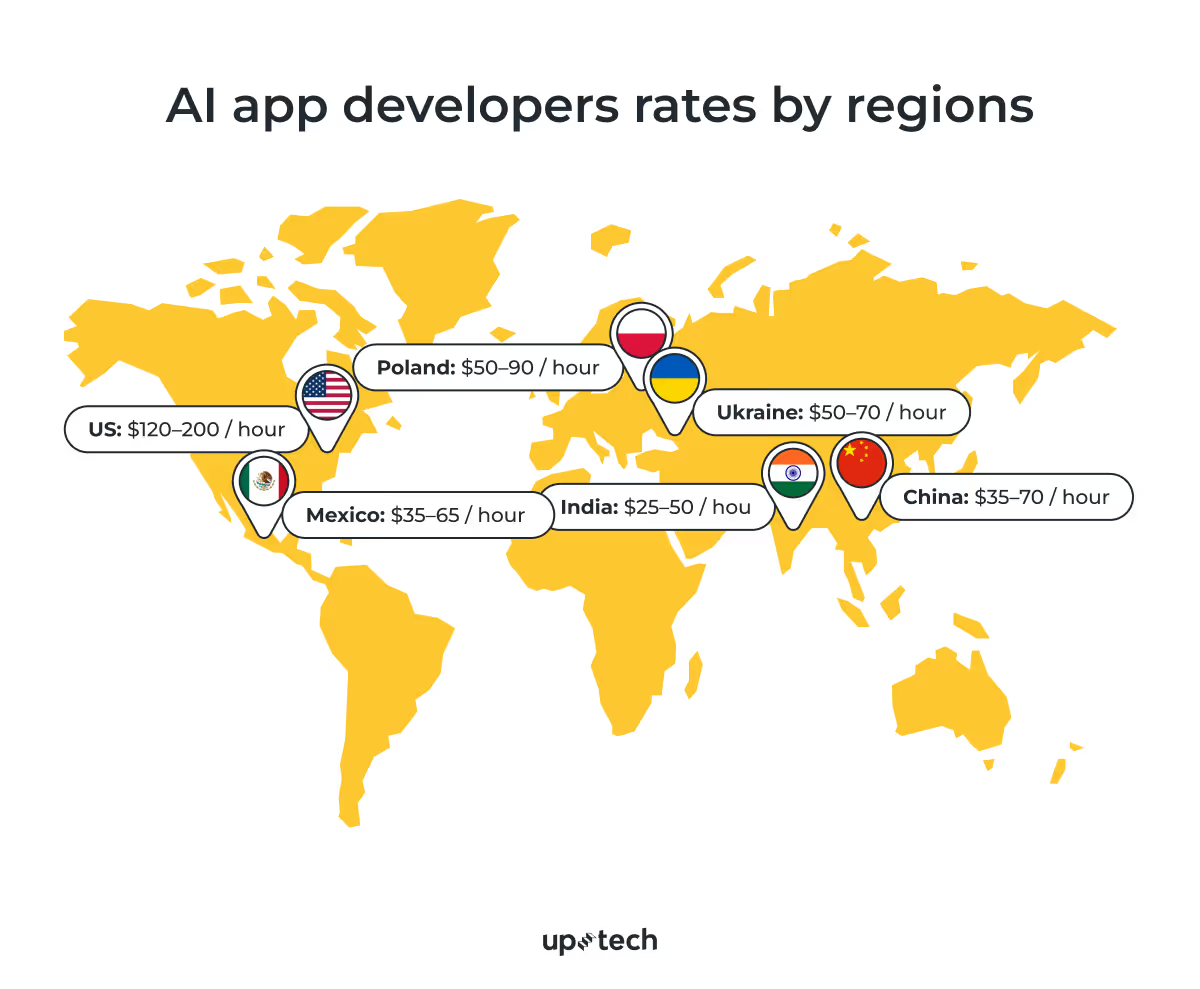
While business owners want to lower the cost when developing an AI app, it isn’t wise to choose a developer solely based on their rate. Rather, cultural fit, language barrier, and quality should be considered when partnering with an outsourced development team.
Here’s the list of the 12 best countries to outsource software development.
For example, global SMBs and startups like Dollar Shave Club outsource to Uptech. They save a substantial amount of development fees while receiving quality apps and support.

Factor #5: Team composition
As much as you may want to reduce the size of the development team, you need different specialized talents to develop an AI app. It’s unrealistic to hire a single AI developer and expect them to build the app to completion. Often, an AI development team consists of these roles:
- Project manager. Oversees planning, timelines, and coordination across the team.
- AI specialist. Handles model selection, training, integration, and performance evaluation.
- UI/UX designer. Designs the interface and ensures the product aligns with the user journey.
- Business analyst. Translates business goals into product requirements and ensures product–market fit.
- App developers. Build, test, and maintain the application.
- QA engineers. Test the app to identify bugs, edge cases, and vulnerabilities.
Together, the team contributes to your AI app’s success. But that also means you need to provision for the fee that each role commands. Below, we share a rough guideline of their respective rate if you hire them in the US.
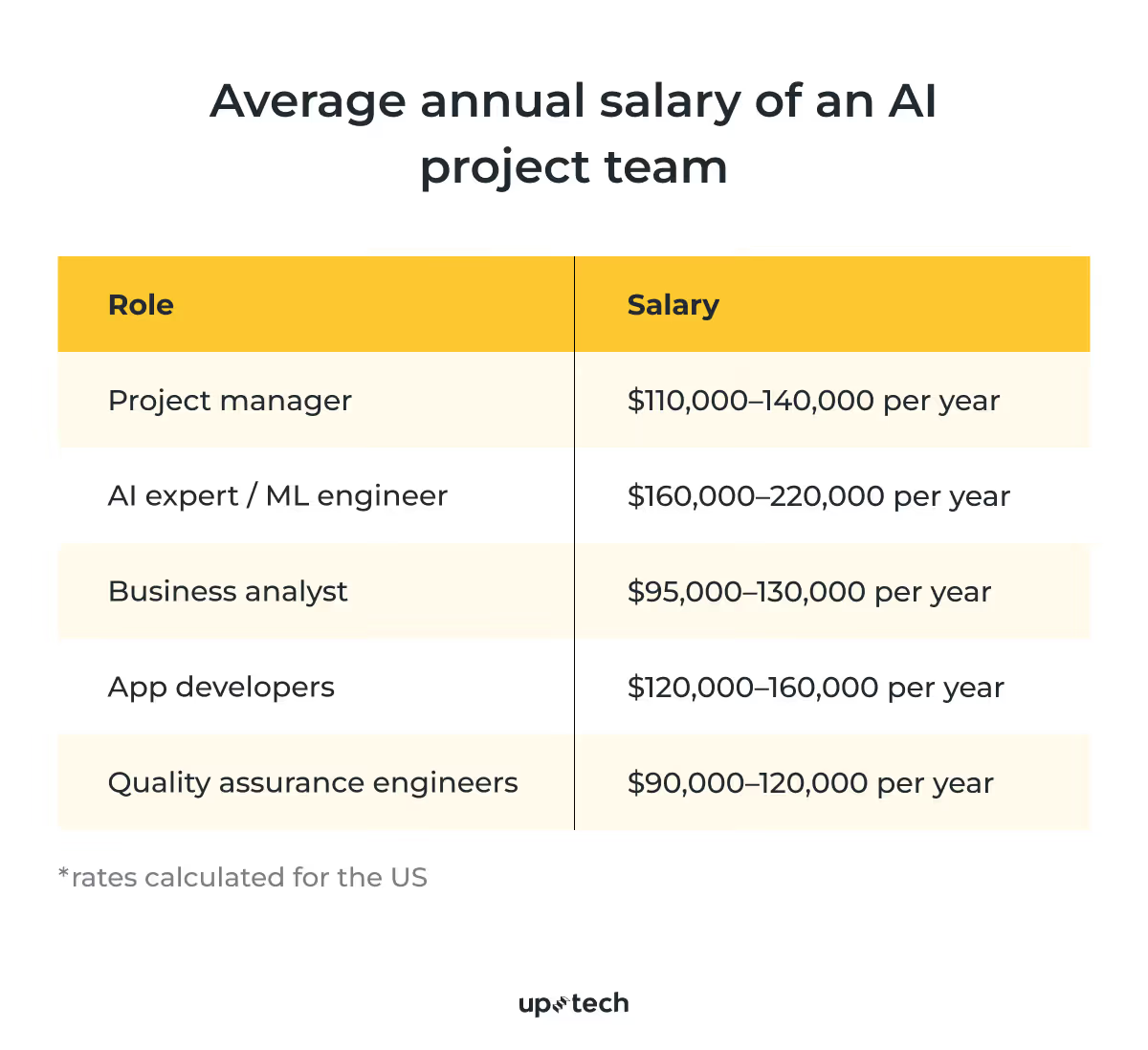
Again, assembling a multi-skilled team can be costly if you’re hiring them from an expensive region. Rather, SMBs benefit financially by outsourcing their AI development needs to talent in Ukraine.
Factor #6: Development platform
When you build an AI app, you also need to decide which platform the app is deployed on. And that decision can determine how much you eventually pay for the development.
Web apps
Web apps run on browsers and behave almost similarly to native apps in terms of user interface and visuals. They are also cheaper to build and maintain because developers only need to create a single codebase. That said, web apps are not suitable if you need to access the phone’s hardware and other capabilities that native apps provide.
Native apps
Native apps are apps designed specifically to run on Android or iOS. They are more complex and more costly to build. However, the advantage of these apps is that you can access the operating systems' native functionalities more effortlessly. For example, integrating cameras, microphones, and sensors is easier with native apps. You can learn more about the cost of building mobile apps here.
Cross-platform apps
Cross-platform development lets you build an app that targets multiple platforms with a single codebase. Let’s say you want to launch your AI app on Android and Apple devices, but you don’t want to do the work twice. That’s where cross-platform apps come in.
In this approach, developers use frameworks such as Xamarin to build apps that run on multiple platforms. This approach saves time, effort, and money. The only caveat is that there’s a marginal performance gap compared to native apps.
Choosing between native and cross-platform development? Check our article to make a wise decision.
Hybrid apps
Hybrid apps, as the name implies, run on the web and mobile on any platform. Like cross-platform apps, developers create and maintain only a single codebase. They’re also the most cost-friendly if you want to target users on all platforms. However, like web apps, you can’t access platform-specific features or achieve the level of performance that native apps do.
Factor #7: Industry specifics
Another variable you need to consider is the industry that your AI app serves. Some industries enforce stringent regulations, which your app must comply with. For example, an AI-powered medical app must comply with HIPAA, GDPR, and other local acts. In finance, apps must adhere to KYC regulations, PCI-DSS, and relevant data privacy acts.
To ensure compliance, developers must perform due diligence, such as going through the guidelines, creating a checklist, applying security measures, and auditing the app. These efforts will ultimately affect the final cost of building the AI app.
Want to learn more about fintech security, build a 100% secure app, and get the list of the key fintech regulations and policies? Get our fintech security checklist.
Factor #8: Post-launch operations
We briefly mentioned the need to maintain your AI app after releasing it. Now, let’s dive deeper into the necessary tasks that you need to budget for.
Stakeholder training
Don’t assume that users, whether internal or external, can adapt or transition to the AI app seamlessly. In some cases, you’ll need to brief, train, and align their expectations with the AI features rolled out in the app.
Beyond basic onboarding, this often includes:
- Educating users on when to rely on AI and when to apply human judgment
- Clarifying limitations to prevent overtrust or misuse
- Updating training materials as AI behavior or features change
- Supporting internal teams (sales, support, operations) who interact with AI outputs indirectly
Well-executed training prevents costly misunderstandings about what the AI can and cannot do.
AI performance monitoring
AI models, despite their intelligence, are not perfect. You’ll need a support team to continuously monitor the app for biased or inaccurate responses. This is particularly important if your app is applied in mission-critical applications, such as medical or finance.
In practice, monitoring includes:
- Tracking accuracy and relevance over time as user behavior changes
- Detecting drift in model performance caused by new data patterns
- Identifying edge cases that weren’t visible during testing
- Ensuring outputs remain aligned with regulatory and ethical standards
This ongoing oversight is essential to maintaining trust and avoiding compliance risks.
System updates and bug fixes
Occasionally, your app requires minor updates to address bugs that manifest during actual usage. Also, as new versions of AI models become available, you might also need to revise the app to better address users’ needs.
Additional considerations at this stage include:
- Managing compatibility between new model versions and existing workflows
- Retesting critical flows after updates to prevent regressions
- Balancing improvements with stability to avoid disrupting users
- Planning upgrades in a way that aligns with business priorities, not just technical availability
As these tasks might be sporadic but require specialized skills, most SMBs outsource them to external software development vendors like Uptech. This way, they can focus on valuable business activities instead of tending to technical issues.
Factor #9: Hidden costs
When you develop AI apps, be wary of hidden costs that may add up to a substantial sum. Like it or not, these costs are unavoidable, but knowing what they are can help SMBs plan and manage their budget accordingly.
AI infrastructure cost
Generative AI models can require significant computing power — especially during training, fine-tuning, or when serving large volumes of users. But in most real-world SMB cases, teams don’t buy expensive hardware. They run AI workloads in the cloud.
Purchasing dedicated GPUs can be prohibitively costly: high-end data center GPUs can cost tens of thousands of dollars per unit, and large-scale training may require multiple GPUs. That’s a real scenario — but it’s not the default for most companies building AI-enabled products.
A more common approach is to use cloud providers like AWS and rent GPU instances on demand. For many AI applications (especially when hosting open-source models), infrastructure often costs roughly $2–5 per hour per GPU instance, depending on the model size and performance requirements. This lets teams start small, keep costs predictable, and scale up only when usage grows.
This pay-as-you-go model makes AI infrastructure far more accessible for startups and SMBs — without the upfront investment or maintenance burden of owning hardware.
Data security cost
Training and operating generative models require collecting, storing, and exchanging massive volumes of data. That brings up another concern — security. Users are rightfully worried that AI apps risk being targeted by cybercriminals, which calls for mitigative measures to secure the data.
For example, we encrypt data that AI apps collect, store, and process. Our team also ensures that the code, database, and infrastructure are secured against data breaches and cybercriminal attempts. These measures, while adding some cost, are necessary to protect customer privacy.
App publishing fee
Though minimal, SMB owners must bear the cost of publishing their apps on the Apple App Store and Google PlayStore. Google charges a $25 one-time fee, while Apple charges $99 for a yearly renewal.
How to Reduce AI App Development Cost: 6 Ways
Unlike common misconceptions, AI development costs almost never extend beyond millions of dollars unless you’re training a billion-parameter model like GPT. That said, paying tens of thousands of dollars to build an AI product can stretch an SMB’s budget to its limit.
Understandably, business owners want to keep the cost of AI software as low as possible. Based on our experience, here’s what you can do.

1. Focus on core AI features first
AI can innovate various parts of the customer journey, but not all will deliver similar impacts to your business. So, don’t spend all your budget on AI features that customers don’t find useful. The worst thing about developing AI software is spending a hefty sum on meaningless features.
If you’re not sure which AI feature to focus on, we recommend conducting a thorough discovery phase to find out. Then, build an MVP to test it out. Then, improvise based on their feedback to create a purposeful and engaging product. By doing this, you can reduce the risks of a non-performing product and save unnecessary costs.
2. Choose a flexible tech stack
Don’t burden your development team with rigid software technologies. The time wasted in putting together incompatible coding tools, debuggers, and AI frameworks can result in additional costs and opportunity losses. Rather, use open-source platforms, low-code/no-node tools, plugins, and other software resources that can accelerate development.
3. Leverage pre-trained AI models
Just because OpenAI trains an entire GPT model from scratch doesn’t mean you need to follow suit. Such exercises cost millions of dollars and take months to complete. Many business owners couldn't afford the time and money that large AI enterprises could.
Besides, most apps that SMBs want to build don’t require complete model training. Fine-tuning, which exposes a pre-trained model to business-specific information, is more than enough. Instead of millions, you only pay thousands of dollars to prepare an AI model tailored to your specific needs.
4. Use cloud-based AI platforms
If you want to avoid investing in costly AI infrastructure, we suggest leveraging AI platforms offered by cloud providers. These cloud-based AI platforms let you train and operate generative AI models and pay only for the resources used. Plus, you don’t need to spend on provisioning, securing, and maintaining the servers in the long run.
5. Outsource to AI developers
Some SMBs want more control over their development workflow and prefer to hire in-house. But if you want to reduce AI implementation costs, consider outsourcing. Even if you outsource a portion of the development, you can greatly lower your recurring expenses.
Imagine saving more than half in salaries when you outsource to AI developers in Ukraine instead of hiring from local marketplaces. Or not having to pay for additional workspace, software licenses, training, and perks that in-house hire requires. Plus, you can access a broader pool of talents with specialization not easily accessible in your local marketplace.
6. Automate data labeling and preparation
Despite its sophistication, an AI model needs to learn from additional data to develop new knowledge of your business. These data need to be labeled so AI developers can use it to fine-tune the model. Data labeling, however, is a laborious process that increases expenses and development time.
Therefore, we recommend automating data preparation, including labeling. For example, you can use machine learning technologies to augment human annotators when labeling the data. This greatly speeds up the process and also reduces labeling mistakes.
AI App Development Cost: Uptech Cases
Every business is unique, and so is every AI app they build. As such, we can’t provide a deterministic figure until we truly understand a client’s requirement. That said, our team has developed several AI apps, and we’ll share some of the estimates.
Dyvo.ai for business
Dyvo.ai for business is an in-house AI app we built to help business owners capture professional-looking product photos. Think about capturing a snapshot of a dress on your phone and getting a studio-quality version of it in seconds with generative AI. On top of that, Dyvo.ai for business also features background removal, resizing, upscaling, and other tools to create brand-aligned product photos.
Cost: Apps similar to Dyvo.ai cost $25,000 to $50,000 to build.

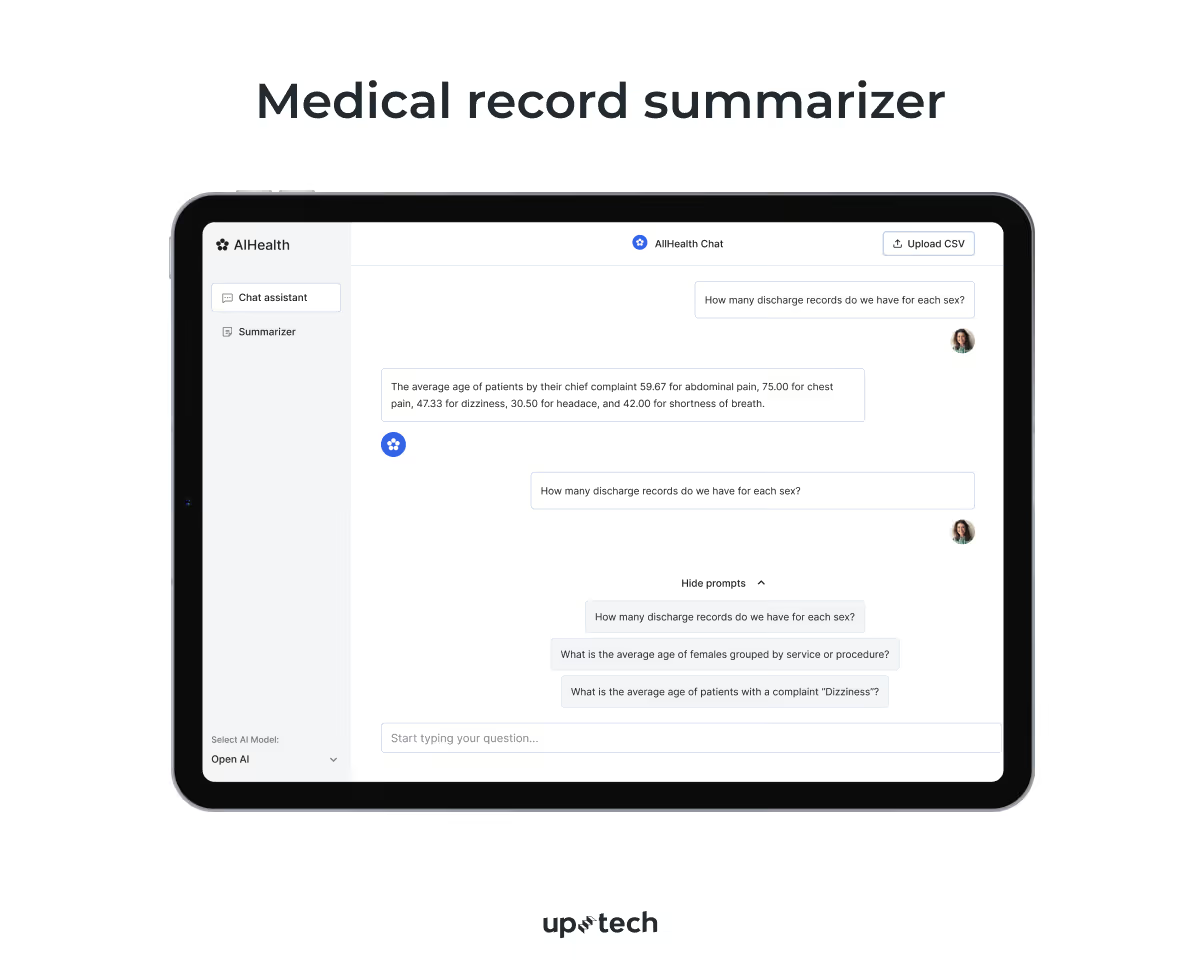
Medical record summarizer
Another AI project we did was a medical record summarizer. Rather than building the entire app, we started with a proof of concept. Our goal is to reduce the time that healthcare professionals spend reviewing medical records. To do that, we retrieve key information from the records with AI and natural language processing technologies.
Cost: PoC starts from $10,000, a complete app potentially costing $30,000-40,000.
Medical documents processing system
In a more advanced healthcare AI case, we worked with a private diagnostic clinic to automate the processing of medical records and related data.
The medical documents processing system used secure, self-hosted workflows to scan and classify clinical documents and extract structured data. This approach reduced manual handling and supported compliance with regulations such as HIPAA.
By combining OCR, NLP, and machine learning, the system improved extraction accuracy and cut analysis time by up to 30%, which let healthcare teams spend less time on paperwork and more time on patient care.
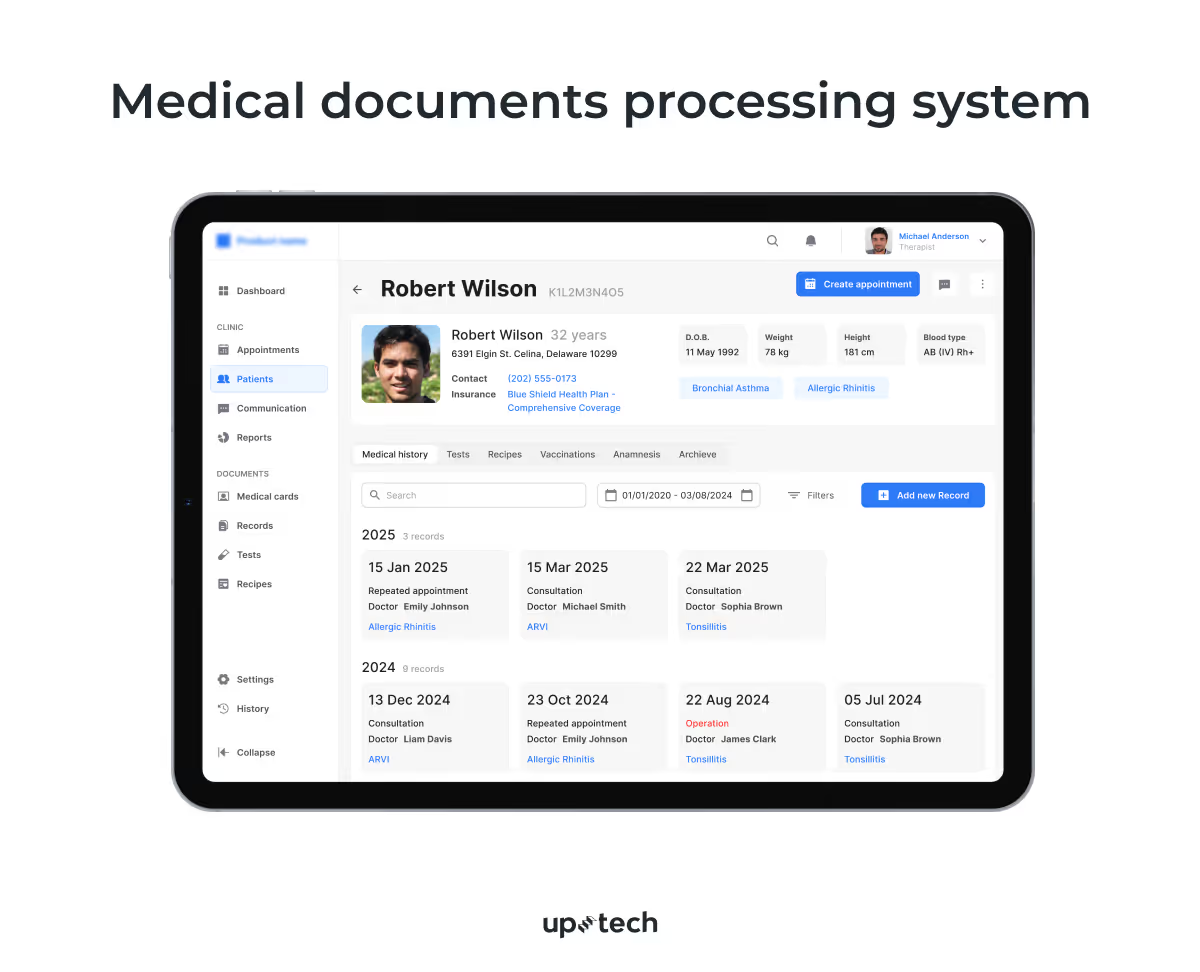
Cost: PoC starts at ~$20,000, while a full production system typically ranges between $70,000–$85,000, factoring in HIPAA compliance, data anonymization, and multi-layer AI processing (OCR + NLP + ML).
As you can see, the price of building AI software varies greatly. Every aspect influencing the development can dictate the final fee you pay. Though not in the range of millions, the expenses can still be overwhelming for small business owners.
Conclusion
The cost of an AI app is shaped by how clearly the work is defined. When the use case is narrow, the scope is controlled, and the level of AI matches the actual business need, budgets stay predictable. When those things are vague, costs rise quickly.
For SMBs, successful AI projects usually start small and practical. Teams focus on one workflow, one decision, or one problem where AI can remove friction or save time. From there, it becomes easier to decide whether deeper customization or expansion is worth the extra investment.
AI doesn’t have to be complex to be valuable. With clear priorities and realistic expectations, it can be built and maintained as a stable part of the product — one that supports the business today and leaves room to grow tomorrow.

FAQ
How much will it cost to develop an AI app?
Be prepared to pay between $30,000 to $250,000+ to build an AI app. For complex AI apps that require training the model from scratch, the fee could go beyond the average range. The cost that business owners bear depends on several factors, including feature complexities, data preparation, location of AI developers, and app platforms.
How much does an AI developer cost?
It depends on which country the AI developer is based in and the hiring model. AI developers in major economies like the US, UK, and Australia tend to command a more expensive fee, which often exceeds $150 per hour. However, you pay $50 or less per hour if you outsource to talent in Ukraine, India, China, and other more affordable regions.
That said, don’t hire an AI developer based on cost alone. Consider quality, cultural fit, and communication barriers too because these factors will determine your project’s success.
SMBs stand to lose their competitive advantage if they hesitate to innovate with generative AI. Still, an evolving technology, generative AI is already disrupting various industries and challenging how businesses conduct day-to-day operations. When you develop an AI app, you can:
- Engage your customers by providing a personalized experience.
- Automate repetitive tasks and free up time for more valuable business activities.
- Save costs by operating with a leaner team and let AI do the heavy lifting.
- Discover new opportunities made possible by generative AI’s capabilities.
- Analyze business data at scale and use it to support decision-making.





































.avif)